|
Task Management Software |
|
|
|
|
|
| |
|
TESTIMONIALS
|
|
"...This is an excellent program. I'm so glad that I stumbled on to this when researching for task management programs. Very low learning curv, quite flexible, and the price is right. Tried at least 20 other programs, either too complicated, too expensive, or poor documentation..."
Chad Lindsey -
Honolulu, HI
|
|
|
|
|
|
|
|
Business Process Flowchart Checklist |
|
|
|
|
|
 |
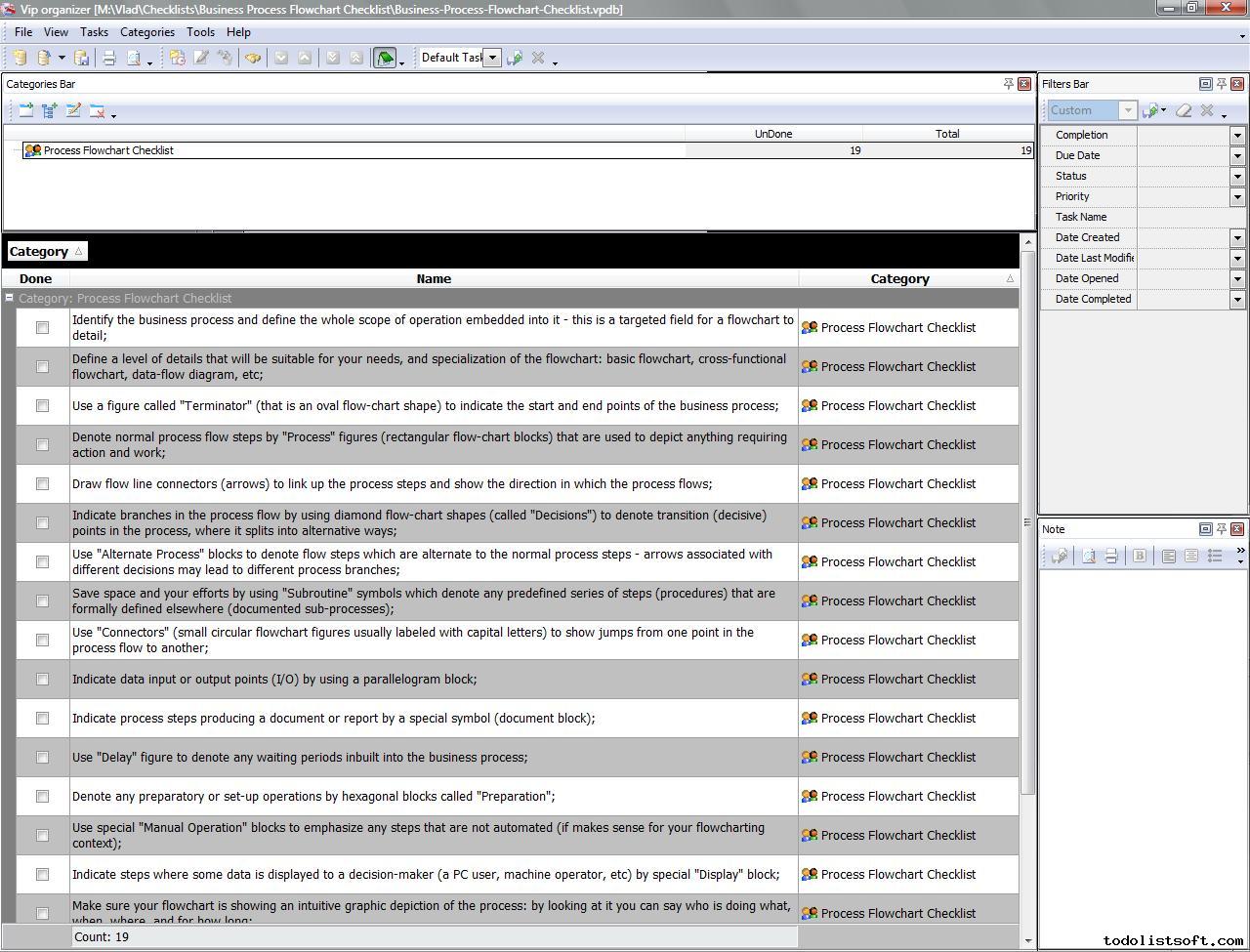
Business Process Flowchart Checklist is made for enterprise executives who wish to schematize their business processes to obtain their vivid representations. With an aid of this checklist you can study the major flowchart shapes and how they should be used to represent your process.
You can download this template in VIP Organizer or VIP Team To Do List database format.
business-process-flowchart-checklist.zip 2 Kb
Order 750 checklists in MS Word and PDF printable format at $49.99 USD only. BUY NOW!  |
|
Process Flowchart Checklist:
- Identify the business process and define the whole scope of operation embedded into it – this is a targeted field for a flowchart to detail;
- Define a level of details that will be suitable for your needs, and specialization of the flowchart: basic flowchart, cross-functional flowchart, data-flow diagram, etc;
- Use a figure called “Terminator” (that is an oval flow-chart shape) to indicate the start and end points of the business process;
- Denote normal process flow steps by “Process” figures (rectangular flow-chart blocks) that are used to depict anything requiring action and work;
- Draw flow line connectors (arrows) to link up the process steps and show the direction in which the process flows;
- Indicate branches in the process flow by using diamond flow-chart shapes (called “Decisions”) to denote transition (decisive) points in the process, where it splits into alternative ways;
- Use “Alternate Process” blocks to denote flow steps which are alternate to the normal process steps – arrows associated with different decisions may lead to different process branches;
- Save space and your efforts by using “Subroutine” symbols which denote any predefined series of steps (procedures) that are formally defined elsewhere (documented sub-processes);
- Use “Connectors” (small circular flowchart figures usually labeled with capital letters) to show jumps from one point in the process flow to another;
- Indicate data input or output points (I/O) by using a parallelogram block;
- Indicate process steps producing a document or report by a special symbol (document block);
- Use “Delay” figure to denote any waiting periods inbuilt into the business process;
- Denote any ......
Order 750 checklists in MS Word and PDF printable format at $49.99 USD only. BUY NOW!
|
|
|
|
|
|
|
|
|
|
| VIP Task Manager |
Multi-user project management software
to plan, schedule and track project tasks. |
 |
|
|
| CentriQS |
All-in-one business management software for small and midsize enterprises |

 |
|
|
| VIP Checklists
|
More than 750 ready-to-use to-do lists to plan your personal and business life |

 |
|
|
| VIP Team To Do List |
Professional task management software
to make and send team todo lists by email |

 |
|
|
| VIP Organizer |
Personal time management software to organize time at home and at work |

 |
|
|
| VIP Simple To Do List
|
Simple and effective to-do list software to plan daily chores, trips, wedding, etc. |
 |
|
|
|
|
|
|
|