Products
Solutions
Download
Buy
Support
Contact
My Account
Home
»
VIP Organizer
»
Online Manual
»
VIP Organizer: Deleting a Category
Tweet
About
System Requirements
User interface summary
Main Toolbar
Navigation Bar
Categories Bar
Filters Bar
Tasks List
Export of Tasks Toolbar
Tray Bar
Columns Layout
Creating a New Task
Deleting existing Task
Editing existing Task
Filter Tasks
Group Tasks
Sorting Tasks
Recurrences Tasks
Reminder
Change of categories
Management a task order
Task Properties
Find Text
Category Summary
Create a Category
Add Sub Category
Editing a Category
»
Deleting a Category
Management a category order
Sorting Categories
Change Category Hierarchy
Import/Export CSV
Export Tasks List
Create a new Database
Open Database
Save Database
Protection information
General Options
Appearance
Tasks List Options
SMTP Options
Upgrades
Technical Support
Purchase
License Agreement
Contact Information
TESTIMONIALS
"... I have been using VIP Organizer for 2 years and find it to be the best software available for managing my task list. It is highly effective, user friendly and priced competitively...."
Ellis L. Marples,
-
Stockholm, NJ
MORE FEEDBACKS
Authorization
Login:
Password:
Remember Me
Register
Forgot your password?
Login As:
Login As
You can log in if you are registered at one of these services:
Google
Twitter
Facebook
Livejournal
Blogger
OpenID
LiveID
Use your Google account to log in.
Use your Twitter.com profile to log in.
Use your Facebook.com profile to log in.
.livejournal.com
.blogspot.com
OpenID:
Use your Windows Live ID to log in.
VIP Organizer: Deleting a Category
Follow these steps:
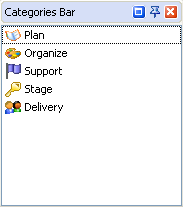
1. Select the required category in the
Categories Bar
and press the
button.
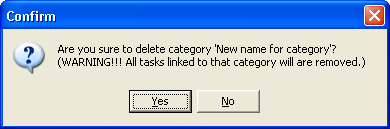
2. The confirmation dialogue box will appear requesting confirmation prior to delete selected category and related tasks linked to that category.
Warning:
If you delete a category all the tasks linked to that category will also be deleted.
3. Click the
Yes
Button.
6. To exit the dialogue, press
Esc
on the keyboard, or use the
button in the category manager dialogue box.
Related topics:
Category Summary
Create a category
Add sub category
Editing a category
Deleting a category
Managing the category order
Sorting Categories
Change Category Hierarchy
*Products*
Solutions
Download
Buy
Support
Contact
My Account
Copyright © 2004 - 2012 VIP Quality Software, Ltd. All Rights Reserved.
Site Map
Legal Information